

Introducing Eco Mode: Powerful AI That Uses Less Energy
Eco Mode routes to highly capable Mixture-of-Experts models that activate just 3–6% of their parameters per response — consuming less energy and stretching your AI usage budget 10–30x further. Powerful AI with a smaller footprint, available with a single toggle.
If you open any chat in ARMES, you'll notice a new option in the mode selector: Eco Mode.
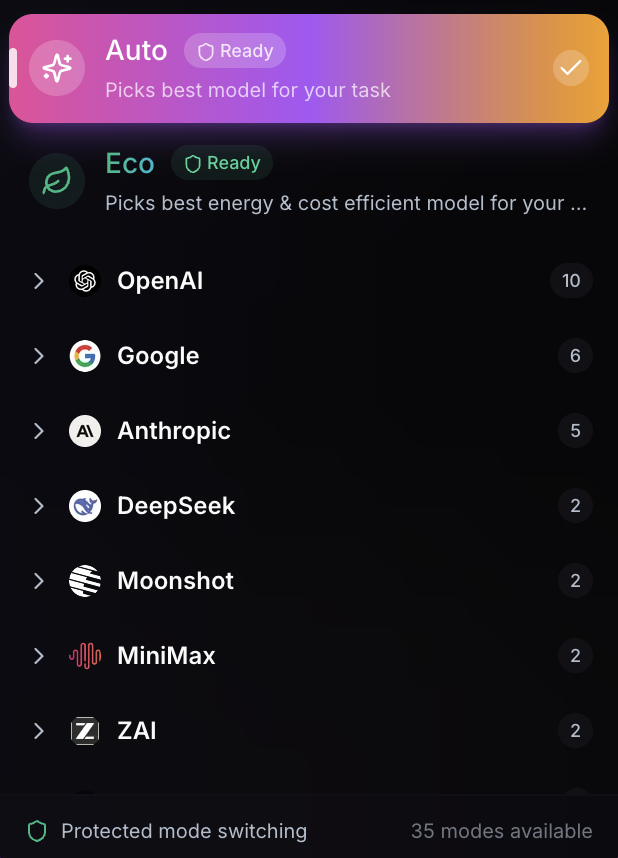
Eco Mode is entirely your choice — it won't be automatically applied to any of your chats. You select it when you want it, the same way you'd choose Auto Mode or manually pick a model. Your existing chats, preferences, and workflows are completely unaffected.
So what is it? Eco Mode is a new AI routing option that delivers strong, capable intelligence while consuming meaningfully less energy per response. It uses a class of models built on a fundamentally more efficient architecture — and as a direct benefit of that efficiency, it stretches your ARMES usage budget significantly further.
Here's why that matters.
The Energy Problem With AI
When you send a message to a frontier AI model, your request is processed by a massive neural network — often hundreds of billions of parameters, all activated simultaneously for every single response. Whether you're asking for the weather forecast or writing a business plan, the full weight of the model fires.
This is powerful. It's also wasteful for the vast majority of everyday tasks.
The AI industry has recognized this. A new class of models has emerged using sparse Mixture-of-Experts (MoE) architectures — models with hundreds of billions of total parameters that only activate a small fraction of them per response. A model with 671 billion parameters might only fire 37 billion for your answer. One with 400 billion parameters activates just 17 billion.
This isn't a compromise. It's more intelligent engineering. The model has vast knowledge encoded across all its parameters, but it routes each request through only the expert sub-networks most relevant to the task. The result: strong, capable responses that consume a fraction of the compute — and a fraction of the energy.
How Eco Mode Works
When you select Eco Mode in any ARMES chat, the platform still analyzes your query and intelligently routes to the best model for the task — the same smart routing you get with Auto Mode. The difference is the model pool. Instead of routing to models like GPT-5.2, Claude Sonnet 4.6, and Gemini 3.1 Pro, Eco Mode selects from a curated pool of highly capable MoE models:
These models activate just 3–6% of their total parameters per response. That's the core of what makes Eco Mode both energy-efficient and cost-efficient — less compute per answer, without meaningfully sacrificing quality.
These Are Not Budget Models
Let's be clear about what's in the Eco pool. These are serious models with real benchmarks:
- MiniMax M2.5 scores 80.2% on SWE-Bench Verified — matching Claude Opus 4.6, one of the most powerful (and expensive) coding models available
- Gemini 3 Flash hits 99.7% on AIME and 90.4% on GPQA Diamond — near-frontier performance on competition math and graduate-level science
- Kimi K2.5 can coordinate up to 100 parallel sub-agents for complex research and planning tasks
- DeepSeek V3.2 scores 93.1% on competition math while activating just 5.5% of its parameters
Eco Mode doesn't route to weaker models. It routes to efficient ones.
Less Energy, More Conversations
The efficiency of MoE architectures creates a direct benefit for your ARMES experience: because these models cost significantly less to run, they consume far less of your AI usage budget per response.
How much less? Roughly 10–30x cheaper per response compared to Auto Mode's frontier models.
In practical terms: if Auto Mode gives you approximately 100 quality conversations within your monthly budget, Eco Mode could give you 1,000+ for the same budget. That's not a rough estimate — it's the math of running a 37-billion-parameter forward pass instead of a full frontier model activation.
This means Eco Mode pairs naturally with the cost-based budget system. Your plan's included budget goes dramatically further, and you can monitor your usage anytime in Settings > Billing where the Usage Meter shows your daily and monthly progress at a glance.
The Smart Strategy: Auto + Eco
Eco Mode isn't a replacement for Auto Mode. It's a complement. The most effective way to use ARMES is to use both strategically:
Use Auto Mode when you need the best. Complex strategic analysis. PhD-level reasoning. Nuanced legal questions. Multi-hundred-page document processing. Creative work where you want the absolute frontier of AI capability. Auto Mode routes to the most powerful models available — GPT-5.2, Claude Sonnet 4.6, Gemini 3.1 Pro, and more — selecting the best model for the specific task.
Use Eco Mode for everything else. Quick questions. Drafting emails. Brainstorming sessions. Code reviews. Data analysis. Writing first drafts. Research summaries. Daily conversations. For the vast majority of everyday AI tasks, you won't notice a meaningful quality difference — and your budget will thank you.
One app. Two strategies. Zero waste.
Who Eco Mode Is For
- Environmentally conscious users who want strong AI with a smaller energy footprint — every Eco response activates a fraction of the compute that frontier models require
- Heavy daily users who want to stretch their plan further and have more conversations without upgrading or buying Boost Packs
- Writers and creators who have many conversations per day and don't always need the absolute frontier model for every draft and brainstorm
- Developers who want capable code assistance for routine work without burning premium budget on every commit message and debug session
- Anyone who uses ARMES regularly and wants a smarter way to allocate their AI budget across tasks that matter more and tasks that matter less
Same Privacy. Always.
Every model in the Eco pool runs through the same zero-data-retention infrastructure as Auto Mode. Your conversations are processed and immediately forgotten. Nothing is stored, profiled, or monetized. The privacy guarantee is identical regardless of which mode you choose.
How to Use It
Eco Mode is available in the mode selector of any ARMES chat — the same place you choose Auto Mode or select a specific model manually. Just switch to Eco, and the platform handles the rest. Intelligent routing still picks the best model for your specific request, drawing from the Eco model pool instead of the frontier pool.
Eco Mode is available on all plans except ARMES GPT Free.
The Bigger Picture
AI doesn't have to be wasteful. The Mixture-of-Experts revolution has proven that activating 37 billion parameters out of 671 billion is enough to deliver exceptional results for the vast majority of tasks. Eco Mode makes that engineering breakthrough accessible with a single toggle.
Use the full power of frontier intelligence when it matters. Use efficient intelligence the rest of the time. Monitor your usage in Settings. And know that every Eco Mode response is consuming meaningfully less energy than a full frontier activation — without meaningfully sacrificing quality.
We believe AI platforms have a responsibility to offer this choice. Not every question needs the most powerful model in the world to answer it. Giving you the option to use efficient intelligence — and rewarding you with extended usage when you do — is how we're building a more sustainable AI experience.
Joseph Founder, ARMES
Written by
ARMES Team
From the team building ARMES — private AI that puts every frontier model in one place.